EMT Practice Test

1. Question Content...


Question List

Question1: Configure your Host Name, IP Address, Gateway and DNS.
Host name: dtop5.dn.ws.com
IP Address: 172.28.10.5/4
Gateway: 172.28.10.1
DNS: 172.28.10.1

Question2: 1. Find all sizes of 10k file or directory under the /etc directory, and copy to /tmp/findfiles directory.
2. Find all the files or directories with Lucy as the owner, and copy to /tmp/findfiles directory.

Question3: Search a String
Find out all the columns that contains the string seismic within /usr/share/dict/words, then copy all these columns to /root/lines.tx in original order, there is no blank line, all columns must be the accurate copy of the original columns.

Question4: Create a 512M partition, make it as ext4 file system, mounted automatically under /mnt/data and which take effect automatically at boot-start.

Question5: CORRECT TEXT
Create a volume group, and set 16M as a extends. And divided a volume group containing 50 extends on volume group lv, make it as ext4 file system, and mounted automatically under /mnt/data.

Question6: Create a volume group, and set 16M as a extends. And divided a volume group containing 50 extends on volume group lv, make it as ext4 file system, and mounted automatically under /mnt/data.

Question7: Create a catalog under /home named admins. Its respective group is requested to be the admin group. The group users could read and write, while other users are not allowed to access it. The files created by users from the same group should also be the admin group.

Question8: : 107 SIMULATION
Add an additional swap partition of 754 MB to your system.
The swap partition should automatically mount when your system boots.
Do not remove or otherwise alter any existing swap partitions on your system.

Question9: One Package named zsh is dump on ftp://server1.example.com under /pub/updates directory and your FTP server is 192.168.0.254. Install the package zsh.

Question10: Search a String
Find out all the columns that contains the string seismic within /usr/share/dict/words, then copy all these columns to /root/lines.tx in original order, there is no blank line, all columns must be the accurate copy of the original columns.

Question11: One Logical Volume named /dev/test0/testvolume1 is created. The initial Size of that disk is 100MB now you required more 200MB. Increase the size of Logical Volume, size should be increase on online.

Question12: Find all lines in the file /usr/share/dict/words that contain the string seismic. Put a copy of all these lines in their original order in the file /root/wordlist. /root/wordlist should contain no empty lines and all lines must be exact copies of the original lines in /usr/share/dict/words.

Question13: Create a volume group, and set 16M as a extends. And divided a volume group containing 50 extends on volume group lv, make it as ext4 file system, and mounted automatically under /mnt/data.

Question14: Configure the verification mode of your host account and the password as LDAP. And it can login successfully through ldapuser40. The password is set as "password".
And the certificate can be downloaded from http://ip/dir/ldap.crt. After the user logs on the user has no host directory unless you configure the autofs in the following questions.

Question15: Upgrading the kernel as 2.6.36.7.1, and configure the system to Start the default kernel, keep the old kernel available.

Question16: SIMULATION
Binding to an external validation server.
System server.domain11.example.com provides a LDAP validation service, your system should bind to this service as required:
Base DN of validation service is dc=example,dc=com
LDAP is used for providing account information and validation information Connecting and using the certification of http://server.domain11.example.com/pub/EXAMPLE-CA-CERT to encrypt After the correct configuration, ldapuser1 can log into your system, it does not have HOME directory until you finish autofs questions, ldapuser1 password is password.

Question17: Download ftp://192.168.0.254/pub/boot.iso to /root, and mounted automatically under /media/cdrom and which take effect automatically at boot-start.

Question18: Configure a cron Task.
User natasha must configure a cron job, local time 14:23 runs and executes: */bin/echo hiya every day.

Question19: CORRECT TEXT
Upgrading the kernel as 2.6.36.7.1, and configure the system to Start the default kernel, keep the old kernel available.

Question20: Copy /etc/fstab to /var/tmp name admin, the user1 could read, write and modify it, while user2 without any permission.

Question21: Configure /var/tmp/fstab Permission.
Copy the file /etc/fstab to /var/tmp/fstab. Configure var/tmp/fstab permissions as the following:
Owner of the file /var/tmp/fstab is Root, belongs to group root
File /var/tmp/fstab cannot be executed by any user
User natasha can read and write /var/tmp/fstab
User harry cannot read and write /var/tmp/fstab
All other users (present and future) can read var/tmp/fstab.

Question22: CORRECT TEXT
Configure your Host Name, IP Address, Gateway and DNS.
Host name: station.domain40.example.com
/etc/sysconfig/network
hostname=abc.com
hostname abc.com
IP Address:172.24.40.40/24
Gateway172.24.40.1
DNS:172.24.40.1

Question23: Add a swap partition.
Adding an extra 500M swap partition to your system, this swap partition should mount automatically when the system starts up. Don't remove and modify the existing swap partitions on your system.

Question24: What statement is true regarding the Swarm service created by the following command?
docker service create --name myweb --network webnet --mode global nginx

Question25: The firewall must be open.

Question26: Consider the following Kubernetes Deployment:

With the ReplicaSet:

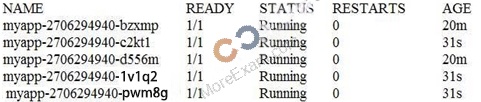
And the Pods:

What happens if one of the Pods is terminated with the command kubect1 pod delete?

Question27: Create a volume group, and set 8M as a extends. Divided a volume group containing 50 extends on volume group lv (lvshare), make it as ext4 file system, and mounted automatically under /mnt/dat a. And the size of the floating range should set between 380M and 400M.

Question28: Binding to an external validation server.
System server.domain11.example.com provides a LDAP validation service, your system should bind to this service as required:
Base DN of validation service is dc=example,dc=com
LDAP
is used for providing account information and validation information Connecting and using the certification of
http://server.domain11.example.com/pub/EXAMPLE-CA-CERT to encrypt
After the correct configuration, ldapuser1 can log into your system, it does not have HOME directory until you finish autofs questions, ldapuser1 password is password.

Question29: Configure the permissions of /var/tmp/fstab
Copy the file /etc/fstab to /var/tmp/fstab. Configure the permissions of /var/tmp/fstab so that:
the file /var/tmp/fstab is owned by the root user.
the file /var/tmp/fstab belongs to the group root.
the file /var/tmp/fstab should not be executable by anyone.
the user natasha is able to read and write /var/tmp/fstab.
the user harry can neither write nor read /var/tmp/fstab.
all other users (current or future) have the ability to read /var/tmp/fstab.

Question30: Configure the FTP service in your system, allow remote access to anonymous login and download the program by this service. Service is still running after system rebooting.

Question31: Part 1 (on Node1 Server)
Task 17 [Accessing Linux File Systems]
Find all the files owned by user "alex" and redirect the output to /home/alex/files.

Question32: Configure a task: plan to run echo "file" command at 14:23 every day.

Question33: SIMULATION
Configure your web services, download from http://instructor.example.com/pub/serverX.html And the services must be still running after system rebooting.

Question34: Add a new logical partition having size 100MB and create the data which will be the mount point for the new partition.

Question35: Configure NTP.
Configure NTP service, Synchronize the server time, NTP server: classroom.example.com

Question36: SIMULATION
Configure a user account.
Create a user iar,uid is 3400. Password is redhat

Question37: Binding to an external validation server.
System server.domain11.example.com provides a LDAP validation service, your system should bind to this service as required:
Base DN of validation service is dc=example,dc=com
LDAP is used for providing account information and validation information Connecting and using the certification of http://server.domain11.example.com/pub/EXAMPLE-CA-CERT to encrypt After the correct configuration, ldapuser1 can log into your system, it does not have HOME directory until you finish autofs questions, ldapuser1 password is password.

Question38: Copy /etc/fstab document to /var/TMP directory. According the following requirements to configure the permission of this document.
The owner of this document must be root.
This document belongs to root group.
User mary have read and write permissions for this document.
User alice have read and execute permissions for this document.
Create user named bob, set uid is 1000. Bob have read and write permissions for this document.
All users has read permission for this document in the system.

Question39: A
YUM repository has been provided at http://server.domain11.example.com/pub/x86_64/Server.
Configure your system to use this location as a default repository.

Question40: Install the appropriate kernel update from http://server.domain11.example.com/pub/updates.
The following criteria must also be met:
The updated kernel is the default kernel when the system is rebooted
The original kernel remains available and bootable on the system

Question41: Add admin group and set gid=600

Question42: Add users: user2, user3.
The Additional group of the two users: user2, user3 is the admin group Password: redhat

Question43: CORRECT TEXT
Create a 512M partition, make it as ext4 file system, mounted automatically under /mnt/data and which take effect automatically at boot-start.

Question44: SIMULATION
There are two different networks, 192.168.0.0/24 and 192.168.1.0/24. Your System is in 192.168.0.0/24 Network. One RHEL6 Installed System is going to use as a Router. All required configuration is already done on Linux Server. Where 192.168.0.254 and 192.168.1.254 IP Address are assigned on that Server.
How will make successfully ping to 192.168.1.0/24 Network's Host?

Question45: Create a collaborative directory/home/admins with the following characteristics:
Group ownership of /home/admins is adminuser
The directory should be readable, writable, and accessible to members of adminuser, but not to any other user. (It is understood that root has access to all files and directories on the system.) Files created in /home/admins automatically have group ownership set to the adminuser group

Question46: CORRECT TEXT
Change the logical volume capacity named vo from 190M to 300M. and the size of the floating range should set between 280 and 320. (This logical volume has been mounted in advance.)

Question47: Part 1 (on Node1 Server)
Task 12 [Accessing Network-Attached Storage]
Configure autofs to automount the home directories of user remoteuserX. Note the following:
utility.domain15.example.com(172.25.15.9), NFS-exports /netdir to your system, where user is remoteuserX where X is your domain number remoteuserX home directory is utility.domain15.example.com:/netdir/remoteuserX remoteuserX home directory should be auto mounted locally at /netdir as /netdir/remoteuserX Home directories must be writable by their users while you are able to login as any of the remoteuserX only home directory that is accessible from your system

Question48: Add a new logical partition having size 100MB and create the data which will be the mount point for the new partition.

Question49: SIMULATION
A YUM repository has been provided at http://server.domain11.example.com/pub/x86_64/Server.
Configure your system to use this location as a default repository.

Question50: Configure your Host Name, IP Address, Gateway and DNS.
Host name: station.domain40.example.com
/etc/sysconfig/network
hostname=abc.com
hostname abc.com
IP Address:172.24.40.40/24
Gateway172.24.40.1
DNS:172.24.40.1

Question51: Part 1 (on Node1 Server)
Task 2 [Installing and Updating Software Packages]
Configure your system to use this location as a default repository:
http://utility.domain15.example.com/BaseOS
http://utility.domain15.example.com/AppStream
Also configure your GPG key to use this location
http://utility.domain15.example.com/RPM-GPG-KEY-redhat-release

Question52: Create a volume group, and set 16M as a extends. And divided a volume group containing 50 extends on volume group lv, make it as ext4 file system, and mounted automatically under /mnt/data.

Question53: SIMULATION
Download the document from ftp://instructor.example.com/pub/testfile, find all lines containing [abcde] and redirect to /MNT/answer document, then rearrange the order according the original content.

Question54: CORRECT TEXT
Configure the system synchronous as 172.24.40.10.

Question55: If a Dockerfilereferences the container's base image without a specific version tag, which tag of that image
is used to create the container?

Question56: Create a user alex with a userid of 3400. The password for this user should be redhat.

Question57: Configure a task: plan to run echo "file" command at 14:23 every day.

Question58: Install the Kernel Upgrade.
Install suitable kernel update from:
http://server.domain11.example.com/pub/updates.
Following requirements must be met:
Updated kernel used as the default kernel of system start-up.
The original kernel is still valid and can be guided when system starts up.

Question59: Configure your Host Name, IP Address, Gateway and DNS.
Host name: station.domain40.example.com
/etc/sysconfig/network
hostname=abc.com
hostname abc.com
IP Address:172.24.40.40/24
Gateway172.24.40.1
DNS:172.24.40.1

Question60: Download ftp://192.168.0.254/pub/boot.iso to /root, and mounted automatically under /media/cdrom and which take effect automatically at boot-start.

Question61: Create the user named eric and deny to interactive login.

Question62: SIMULATION
Create a 2G swap partition which take effect automatically at boot-start, and it should not affect the original swap partition.

Question63: We are working on /data initially the size is 2GB. The /dev/test0/lvtestvolume is mount on /dat a. Now you required more space on /data but you already added all disks belong to physical volume. You saw that you have unallocated space around 5 GB on your harddisk. Increase the size of lvtestvolume by 5GB.

Question64: Which of the following statements is true about load balancers?

Question65: Download the document from ftp://instructor.example.com/pub/testfile, find all lines containing [abcde] and redirect to /MNT/answer document, then rearrange the order according the original content.

Question66: Configure autofs.
Configure the autofs automatically mount to the home directory of LDAP, as required:
server.domain11.example.com use NFS to share the home to your system. This file system contains a pre configured home directory of user ldapuserX.
Home directory of ldapuserX is:
server.domain11.example.com /home/guests/ldapuser
Home directory of ldapuserX should automatically mount to the ldapuserX of the local /home/guests Home directory's write permissions must be available for users ldapuser1's password is password

Question67: Copy /etc/fstab document to /var/TMP directory. According the following requirements to configure the permission of this document.
* The owner of this document must be root.
* This document belongs to root group.
* User mary have read and write permissions for this document.
* User alice have read and execute permissions for this document.
* Create user named bob, set uid is 1000. Bob have read and write permissions for this document.
* All users has read permission for this document in the system.

Question68: Add user: user1, set uid=601
Password: redhat
The user's login shell should be non-interactive.

Question69: One Logical Volume named /dev/test0/testvolume1 is created. The initial Size of that disk is 100MB now you required more 200MB. Increase the size of Logical Volume, size should be increase on online.

Question70: SIMULATION
Make on /archive directory that only the user owner and group owner member can fully access.

Question71: You are a System administrator. Using Log files very easy to monitor the system. Now there are 50 servers running as Mail, Web, Proxy, DNS services etc. You want to centralize the logs from all servers into on LOG Server. How will you configure the LOG Server to accept logs from remote host?

Question72: Part 2 (on Node2 Server)
Task 7 [Implementing Advanced Storage Features]
Create a thin-provisioned filesystem with the name think_fs from a pool think_pool using the devices.
The filesystem should be mounted on /strav and must be persistent across reboot

Question73: Create a backup
Create a backup file named /root/backup.tar.bz2, contains the content of /usr/local, tar must use bzip2 to compress.

Question74: There is a local logical volumes in your system, named with shrink and belong to VGSRV volume group, mount to the /shrink directory. The definition of size is 320 MB.
Requirement:
Reduce the logical volume to 220 MB without any loss of data. The size is allowed between 200-260 MB after reducing.

Question75: CORRECT TEXT
Download ftp://192.168.0.254/pub/boot.iso to /root, and mounted automatically under /media/cdrom and which take effect automatically at boot-start.

Question76: SIMULATION
User mary must configure a task.
Requirement: The local time at 14:23 every day echo "Hello World.".

Question77: There are two different networks, 192.168.0.0/24 and 192.168.1.0/24. Your System is in 192.168.0.0/24 Network. One RHEL6 Installed System is going to use as a Router. All required configuration is already done on Linux Server. Where 192.168.0.254 and 192.168.1.254 IP Address are assigned on that Server. How will make successfully ping to 192.168.1.0/24 Network's Host?

Question78: Adjust the size of the Logical Volume.
Adjust the size of the vo Logical Volume, its file system size should be 290M. Make sure that the content of this system is complete.
Note: the partition size is rarely accurate to the same size as required, so in the range 270M to 320M is acceptable.

Question79: What is the Puppet equivalent to an Ansible Playbook called?

Question80: How does Prometheus gather information about monitored hosts and services?

Question81: Configure the NTP service in your system.

Question82: According the following requirements, configure autofs service and automatically mount to user's home directory in the ldap domain.
- Instructor.example.com (192.168.0.254) has shared /home/guests/ldapuserX home directory to your system by over NFS export, X is your hostname number.
- LdapuserX's home directory is exist in the instructor.example.com: /home/ guests/ldapuserX
- LdapuserX's home directory must be able to automatically mount to /home/ guests/ldapuserX in your system.
- Home directory have write permissions for the corresponding user.
However, you can log on to the ldapuser1 - ldapuser99 users after verification. But you can only get your corresponding ldapuser users. If your system's hostname is server1.example.com, you can only get ldapuser1's home directory.

Question83: Successfully resolve to server1.example.com where your DNS server is 172.24.254.254.

Question84: Upgrading the kernel as 2.6.36.7.1, and configure the system to Start the default kernel, keep the old kernel available.

Question85: Part 1 (on Node1 Server)
Task 1 [Managing Networking]
Please create new network connection with existing interface (enp1s0) using provided values:
IPv4: 172.25.X.10/255.255.255.0 (where X is your domain number: Domain15) Gateway: 172.25.X.2 DNS server: 172.25.X.2 Add the following secondary IP addresses statically to your current running connection. Do this in a way that does not compromise your existing settings:
IPv4: 10.0.0.5/24 and set the hostname node1.domain15.example.com

Question86: SIMULATION
Make a swap partition having 100MB. Make Automatically Usable at System Boot Time.

Question87: According the following requirements to create a local directory /common/admin.
* This directory has admin group.
* This directory has read, write and execute permissions for all admin group members.
* Other groups and users don't have any permissions.
* All the documents or directories created in the/common/admin are automatically inherit the admin group.

Question88: SIMULATION
According the following requirements to create a local directory /common/admin.
This directory has admin group.
This directory has read, write and execute permissions for all admin group members.
Other groups and users don't have any permissions.
All the documents or directories created in the/common/admin are automatically inherit the admin group.

Question89: User mary must configure a task.
Requirement: The local time at 14:23 every day echo "Hello World.".

Question90: Download ftp://192.168.0.254/pub/boot.iso to /root, and mounted automatically under /media/cdrom and which take effect automatically at boot-start.

Question91: There is a local logical volumes in your system, named with shrink and belong to VGSRV volume group, mount to the /shrink directory. The definition of size is 320 MB.
Requirement:
Reduce the logical volume to 220 MB without any loss of dat
a. The size is allowed between 200-260 MB after reducing.

Question92: Make a swap partition having 100MB. Make Automatically Usable at System Boot Time.

Question93: A YUM source has been provided in the
http://instructor.example.com/pub/rhel6/dvd
Configure your system and can be used normally.

Question94: SIMULATION
Notes:
NFS: NFS instructor.example.com:/var/ftp/pub/rhel6/dvd
YUM: http://instructor.example.com/pub/rhel6/dvd
ldap: http://instructor.example.com/pub/EXAMPLE-CA-CERT
Install dialog package.

Question95: Upgrade the kernel, start the new kernel by default. kernel download from this address:
ftp://server1.domain10.example.com/pub/update/new.kernel

Question96: Make on /archive directory that only the user owner and group owner member can fully access.

Question97: Create one partitions having size 100MB and mount it on data.

Question98: Part 2 (on Node2 Server)
Task 5 [Managing Logical Volumes]
Add an additional swap partition of 656 MiB to your system. The swap partition should automatically mount when your system boots Do not remove or otherwise alter any existing swap partition on your system

Question99: One Logical Volume named lv1 is created under vg0. The Initial Size of that Logical Volume is 100MB. Now you required the size 500MB. Make successfully the size of that Logical Volume 500M without losing any data. As well as size should be increased online.

Question100: One Package named zsh is dump on ftp://server1.example.com under /pub/updates directory and your FTP server is 192.168.0.254. Install the package zsh.

Question101: Create the user named eric and deny to interactive login.

Question102: Configure your system so that it is an NTP client of server.domain11.example.com

Question103: Configure
a HTTP server, which can be accessed through http://station.domain40.example.com.
Please
download the released page from http://ip/dir/example.html.

Question104: Update the kernel from ftp://instructor.example.com/pub/updates.
According the following requirements:
* The updated kernel must exist as default kernel after rebooting the system.
* The original kernel still exists and is available in the system.

Question105: Part 1 (on Node1 Server)
Task 11 [Scheduling Future Tasks]
The user natasha must configure a cron job that runs daily at 14:23 local time and also the same cron job will run after every 2 minutes and executes:
/bin/echo hello

Question106: Part 1 (on Node1 Server)
Task 10 [Configuring NTP/Time Synchronization]
Configure your system so that it is an NTP client of utility.domain15.example.com The system time should be set to your (or nearest to you) timezone and ensure NTP sync is configured

Question107: Configure autofs.
Configure the autofs automatically mount to the home directory of LDAP, as required:
server.domain11.example.com use NFS to share the home to your system. This file system contains a pre configured home directory of user ldapuserX.
Home directory of ldapuserX is:
server.domain11.example.com /home/guests/ldapuser
Home directory of ldapuserX should automatically mount to the ldapuserX of the local /home/guests Home directory's write permissions must be available for users ldapuser1's password is password

Question108: SELinux must run in force mode.

Question109: Add users: user2, user3.
The Additional group of the two users: user2, user3 is the admin group Password: redhat

Question110: SELinux must run in force mode.

Question111: Configure your system so that it is an NTP client of server.domain11.example.com

Question112: Install
the appropriate kernel update from http://server.domain11.example.com/pub/updates.
The following criteria must also be met:
The updated kernel is the default kernel when the system is rebooted
The original kernel remains available and bootable on the system

Question113: Create a volume group, and set 8M as a extends. Divided a volume group containing 50 extends on volume group lv (lvshare), make it as ext4 file system, and mounted automatically under /mnt/data. And the size of the floating range should set between 380M and 400M.

Question114: Your System is going to use as a Router for two networks. One Network is 192.168.0.0/24 and Another Network is 192.168.1.0/24. Both network's IP address has assigned. How will you forward the packets from one network to another network?

Question115: 1. Find all sizes of 10k file or directory under the /etc directory, and copy to /tmp/findfiles directory.
2. Find all the files or directories with Lucy as the owner, and copy to /tmp/findfiles directory.

Question116: Update the kernel from ftp://instructor.example.com/pub/updates.
According the following requirements:
The updated kernel must exist as default kernel after rebooting the system.
The original kernel still exists and is available in the system.

Question117: Create a volume group, and set the size is 500M, the size of single PE is 16M. Create logical volume named lv0 in this volume group, set size is 20 PE, make it as ext3 file system, and mounted automatically under data.

Question118: Configure the FTP service in your system, allow remote access to anonymous login and download the program by this service. Service is still running after system rebooting.

Question119: SIMULATION
Create a swap space, set the size is 600 MB, and make it be mounted automatically after rebooting the system (permanent mount).

Question120: Configure your web services, download from http://instructor.example.com/pub/serverX.html And the services must be still running after system rebooting.

Question121: SIMULATION
Configure iptables, there are two domains in the network, the address of local domain is 172.24.0.0/16 other domain is 172.25.0.0/16, now refuse domain 172.25.0.0/16 to access the server.

Question122: A service should be provided to arbitrary clients on the Internet using HTTPS. Any standard client on the
Internet should be able to consume the service without further configuration. Which of the following
approaches can be used to implement these requirements? (Choose three correct answers.)

Question123: SIMULATION
Create the following users, groups, and group memberships:
A group named adminuser.
A user natasha who belongs to adminuser as a secondary group A user harry who also belongs to adminuser as a secondary group.
A user sarah who does not have access to an interactive shell on the system, and who is not a member of adminuser, natasha, harry, and sarah should all have the password of redhat.

Question124: Create a catalog under /home named admins. Its respective group is requested to be the admin group.
The group users could read and write, while other users are not allowed to access it. The files created by users from the same group should also be the admin group.